M&J Kisielakgreenhouse automation Request a quote

A greenhouse climate computer you also carry in your pocket

We design, program and commission greenhouse climate control: ventilation, heating, shading, supplementary lighting and irrigation. Every installation comes with a portal for readings, charts, settings and alarms.

Around 50 installations in Poland, more in the Czech Republic and Slovakia. Our control systems run at, among others, the Warsaw University of Life Sciences (SGGW), the Powsin Botanical Garden and Opole Zoo.

The program runs in the central unit in the greenhouse. The portal is an add-on: if the internet goes down, the climate control keeps running.

portal.kisielak.pl
Greenhouse portal: readings from all zones – temperature, humidity, setpoints, vents, screens and heating
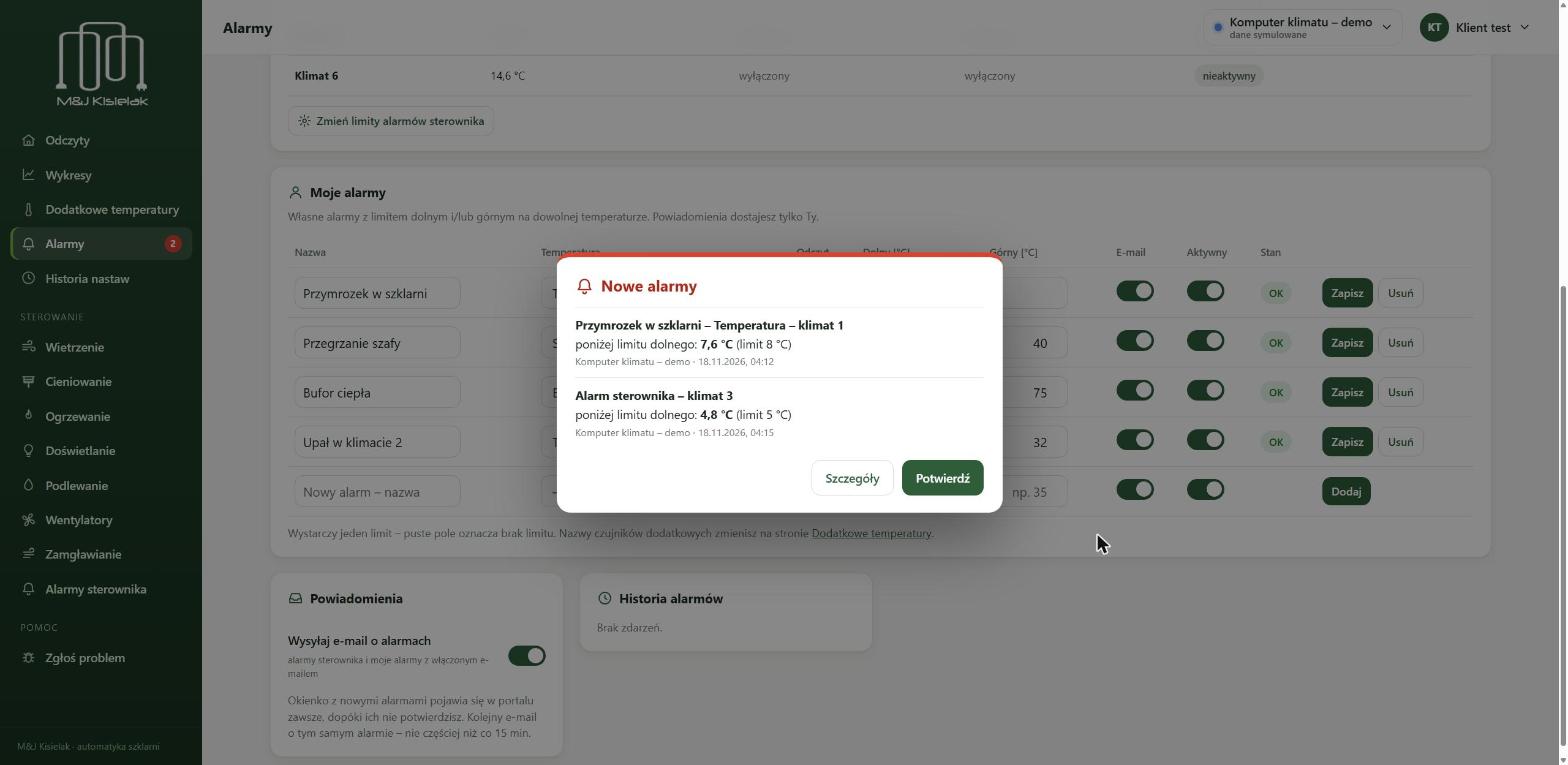
Pop-up with a new temperature alarm in the portal

A day in the greenhouse

This is how the computer runs the climate from night to night. It switches between the day and night setpoints at sunrise and sunset and sets the vents, screens and lamps by temperature, solar radiation and wind.

Daily chart: the greenhouse temperature follows the setpoint – 16 °C at night, 20 °C during the day, with ventilation at midday. 16 °C20 °C
  1. 5:40 The grow lights switch on within their time window if it is too dark.
  2. 6:12 Sunrise: day setpoint 20 °C, the heating circuits raise the water temperature.
  3. 10:40 Temperature above the ventilation setpoint: the vents open step by step.
  4. 12:30 Solar radiation 650 W/m²: the screen closes, irrigation counts the collected energy.
  5. 17:30 Sunset: night setpoint 16 °C, vents closed.
  6. 21:30 A time window with its own temperature – set as many as you need.

What the climate computer controls

We tailor the program to your greenhouse – with no limit on the number of zones, circuits, sections or sensors. The portal shows only the equipment you actually have.

Ventilation
Vent groups in every zone. Ventilation setpoint based on the heating setpoint, wind and rain limits, position calibration.
Heating
Heating circuits with mixing valves and pumps. A day–night schedule with time windows for every circuit.
Shading
Screens controlled by solar radiation and temperature.
Supplementary lighting
Lamp zones switched by time of day and a solar radiation threshold.
Irrigation
Sections with a start calendar for every day of the week and irrigation once a set amount of solar energy has been collected.
Fogging and fans
By humidity and temperature, with hysteresis and run times.
Weather station
Outside temperature, solar radiation, wind speed and direction, rain.
Additional sensors
Extra temperature readings, e.g. substrate, heating pipes or the control cabinet – with your own names.
Heat buffer tank
A vertical tank with a temperature reading on every metre of height: charging and discharging through a pump group with a 3-way valve, a nitrogen cushion held at set pressure, and alarms.
Heating boiler
A solid-fuel boiler with a moving grate: temperature setpoint, combustion air fan, flue fan and grate feed, purges in standby, return temperature protection and a low fuel alarm.

Works without the internet too

All the logic is stored in the central unit in the greenhouse, and there is a touch panel on site. The portal only views the data and passes on setting changes. The connection is encrypted and every central unit has its own access key.

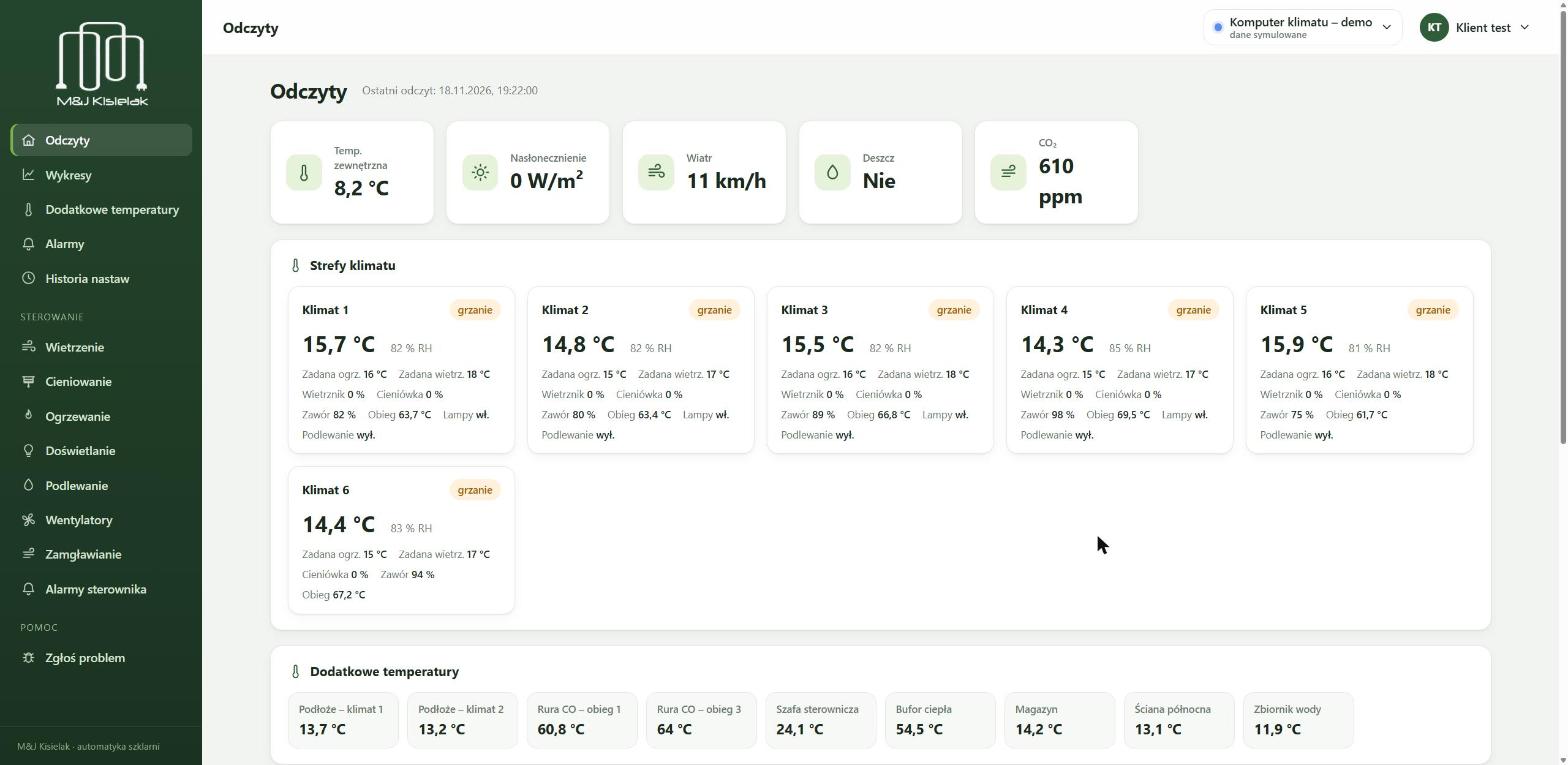
The greenhouse portal

A browser on your computer or phone – no app to install. Accounts for the owner and staff; one account can cover several greenhouses.

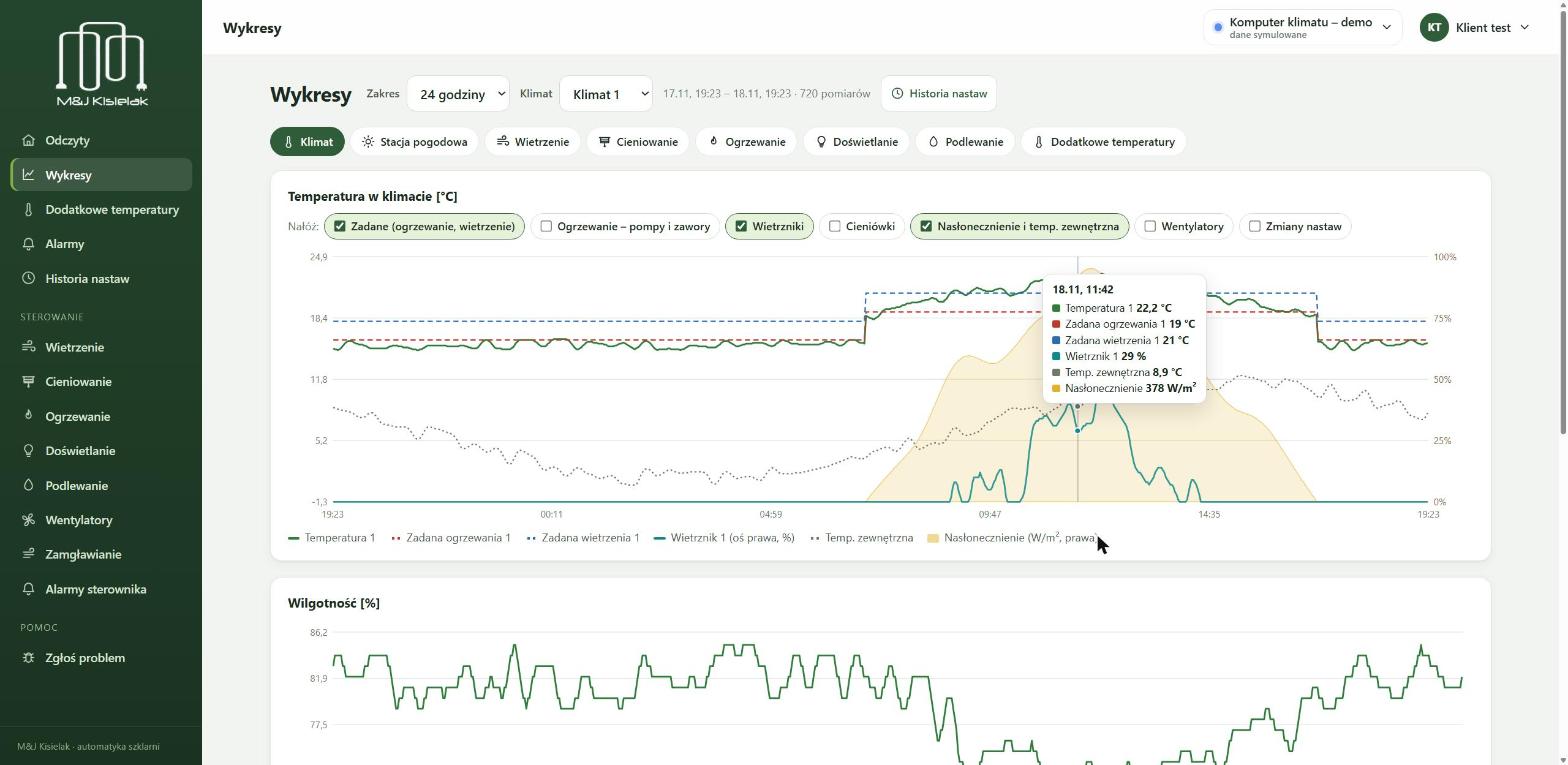
Zone temperature chart with vent operation and solar radiation overlaid, with a reading tooltip

Charts that answer questions

Any period from the whole history – one chart covers up to 30 days. Hover over the chart to see a reading and select part of the time axis to zoom in.

Overlay setpoints, heating, vents, screens, solar radiation and setting changes on the zone temperature – you can see what happened and why.

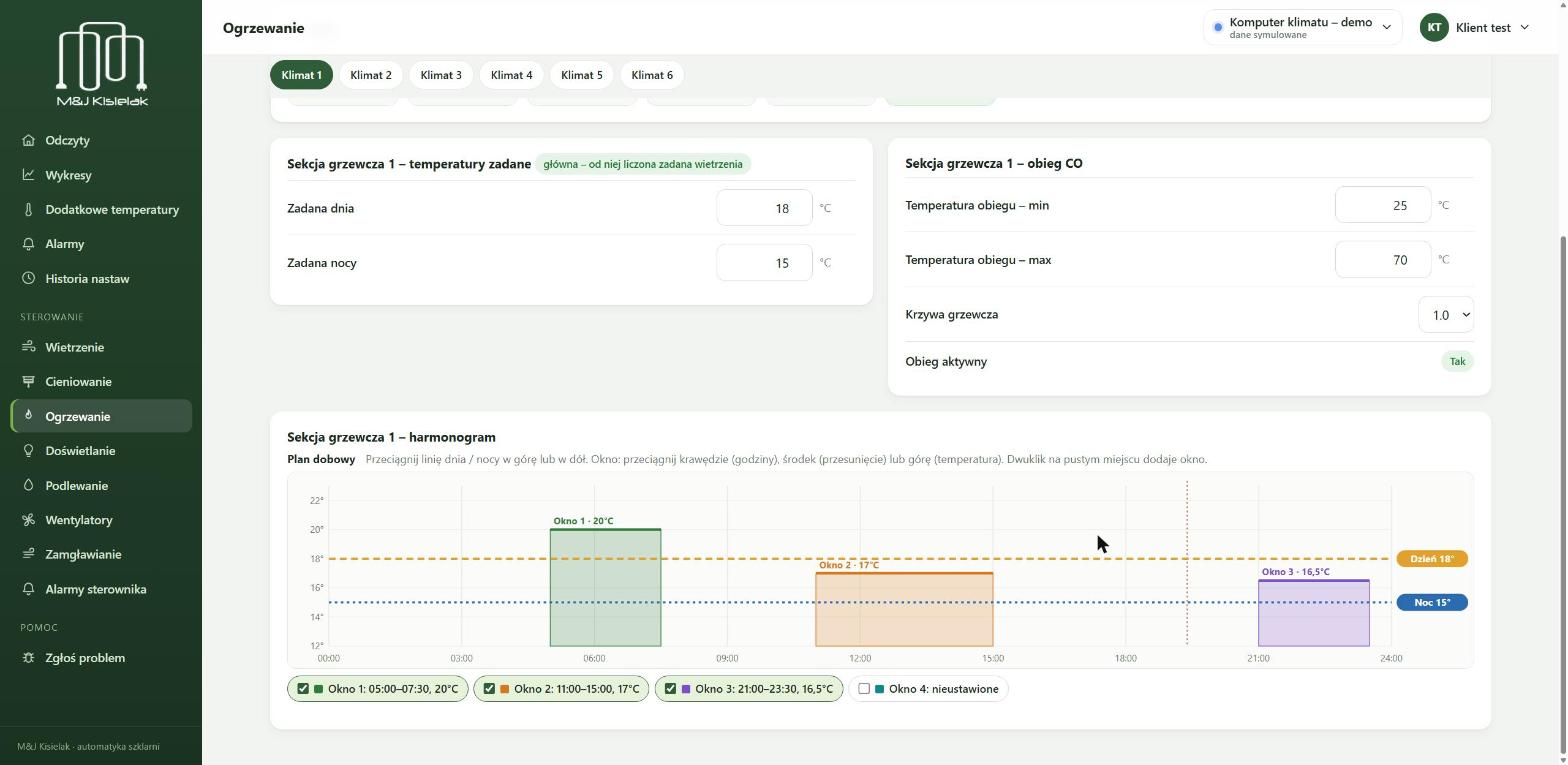
Graphical daily heating schedule: day and night setpoints and time windows

Settings from your phone, the heating schedule on a chart

You change settings in the portal and the central unit fetches them within a minute and confirms them. A change made on the panel in the greenhouse also reaches the portal.

You set the daily heating schedule graphically: day and night setpoints and time windows with a different temperature.

Alarms page in the portal: central unit alarms in zones and your own alarms with limits

Alarms in the portal and by e-mail

When the temperature crosses a limit, an alarm pop-up appears in the portal and an e-mail arrives in your inbox. The pop-up keeps coming back until you acknowledge it.

Besides the central unit alarms you can set your own lower and upper limits on any sensor – only you get those notifications.

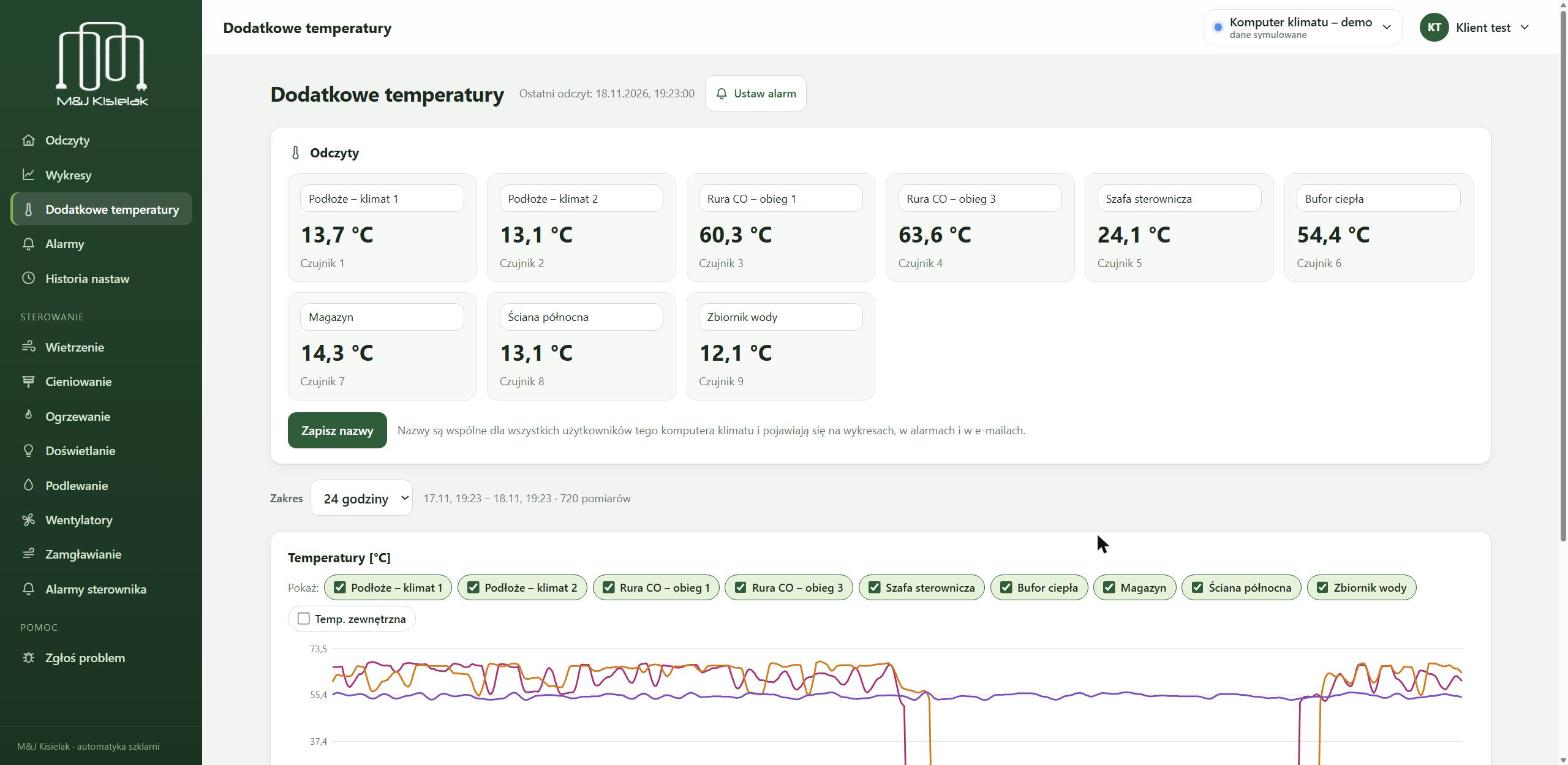
Additional temperature sensors with custom names: substrate, heating pipes, control cabinet, heat buffer

Additional sensors, change history, export

Extra temperature readings with names you choose – with charts and alarms just like the zones.

Every setting change is recorded: who changed it, when and to what value. Download readings from selected days as an Excel file.

The screenshots come from the portal’s demo computer and show the Polish version – the data is simulated. The portal is also available in English.

From our projects

The SGGW greenhouses in Warsaw: nineteen compartments, each with its own climate. Design, control cabinets, program and commissioning – all done by us.

Greenhouse corridor with a control cabinet at every compartment
A cabinet at every compartment: equipment status lamps, manual switches and a main switch.
Main cabinet with the central unit and input modules
Main cabinet: central unit, UPS-backed power supply and an LTE router for the portal.
Touch panel showing a compartment: blinds, vents, climate, irrigation
Touch panel on site: a view of every compartment, blinds, vents, irrigation and air conditioning.
A row of control cabinets along the service corridor
Compartment cabinets in one row along the service corridor.

Around 50 installations in Poland and several in the Czech Republic and Slovakia. Among them:

  • Warsaw University of Life Sciences (SGGW)Warsaw · 19 climate zones, each controlled separately
  • Powsin Botanical GardenWarsaw · 6 climate zones, 4 of them experimental
  • Opole ZooOpole · greenhouse for fish and tropical plants
  • Kvety.sk Trade CentrumSlovakia · display greenhouse of a garden centre
  • Horticultural technical school, Bełska St.Warsaw · 4 climate zones for training
  • Freesia grower4 sites: greenhouses and polytunnel blocks
  • Hodowla Roślin Strzelce, IHAR GroupChełmża · experimental greenhouse (plant breeding)
  • Polytunnel block, Białystokroof ventilation and oil-fired heating
  • Polytunnel block, Dębica3 zones with ventilation and heating
  • Agrolok – experimental laboratoryGolub-Dobrzyń · handover under way

See all projects with photos

How a project runs

  1. Talk and site visit

    We establish how many zones there are, what needs to be controlled and what can be reused from the existing installation.

  2. Design and control cabinet

    We select the sensors, central unit and touch panel and build the control cabinet.

  3. Installation and commissioning

    We connect the equipment, adapt the program to the greenhouse and calibrate the vents, screens and valves.

  4. Portal and training

    We set up the accounts, starting settings and alarms and show you how to use everything on site.

  5. Support after commissioning

    We help remotely through the portal and develop the program together with your crop.

Frequently asked questions

Can my existing climate computer be upgraded?

Usually, yes. The vent and screen motors, valves, pumps and some sensors often stay – we replace the control system. We assess this during the site visit.

What happens if the greenhouse loses its internet connection?

Nothing bad. The central unit runs the climate on its own and you can change settings on the panel in the greenhouse. Once the connection is back, the portal shows readings again and synchronises the settings.

How many zones can one central unit handle?

As many as your greenhouse has – the program does not limit the number of zones, circuits, sections or sensors. A zone is an area with its own temperature and humidity measurement. You see several greenhouses in the portal under one account.

Who has access to my data?

Only the people you give an account to, and our service team. Data is sent over an encrypted connection and you log in to the portal with your own account.

Let’s talk about your greenhouse

Tell us about your greenhouse and what you want to control – we will get back to you to arrange a call or a site visit. We answer in English.

M&J Kisielak Sp. z o.o.
Nawoja 62, 32-065 Nawojowa Góra, Poland
biuro@kisielak.pl
NIP 5130267678, KRS 0000860297